Sunday, June 30, 2013
Countdown to the Apple iPhone 5 Philippine Release Dual Core A6 Processor
One week to go. The other day, we took a look at the Apple iPhone 5s new larger display. Today we go inside. With the HTC One X, Samsung Galaxy S III, LG Optimus 4G and even Lenovo K860 rocking quad core processors, a fair number of people are disappointed with the Apple iPhone 5 only having a dual core processor.
In this regards, the disappointment is more valid than with the issue of the display. Earlier this year, you had quad core phone with aging ARM Cortex A9 processors and dual core phones with the Qualcomm Krait. The dual core Qualcomm Kraits actually could stand toe to toe with the quad core ARM Cortex A9 processors. Basically, it was a battle between four cores versus two faster cores.

The Apple iPhone 5 launched in September follows the model of the Qualcomm Krait, using two faster processors rather than four slower ones. But with Qualcomm quad core Kraits now finding its way into the LG Optimus G and Google Nexus 7, which I expect to be here shortly, the Apple iPhone 5 is really matching the performance of the older Android phones rather than the latest Android phones.
But this does not matter all that much. Apple has its own operating system and app ecosystem. Apple Developers will be supporting the iPhone 4S, iPad 2, iPad 3 and the new iPad mini for at least the next two years, and the A6 on the Apple iPhone 5 and the iPad 4 is roughly twice as the second fastest Apple products. So basically, the Apple iPhone 5 will be fast enough for the two years you plan to keep the phone.
More important than speed, is the move from the 45 nm process to the 32 nm process. This gives it substantially better battery life than the iPhone 4S.
Talk time
Galaxy Note II - 16 hours 57 minutes
HTC One X+ - 13 hours 31 minutes
Galaxy S III (JB) - 10 hours 15 minutes
iPhone 5 - 8 hours 42 minutes
iPhone 4S - 7 hours 41 minutes
Web browsing
iPhone 5 - 9 hours 56 minutes
Galaxy Note II - 8 hours 48 minutes
HTC One X+ - 7 hours 56 minutes
iPhone 4S - 6 hours 56 minutes
Galaxy S III (JB) - 6 hours 27 minutes
Video playback
Galaxy Note II - 11 hours 27 minutes
iPhone 5 - 10 hours 12 minutes
Galaxy S III (JB) - 9 hours 27 minutes
iPhone 4S - 9 hours 24 minutes
HTC One X+ - 8 hours 11 minutes
Source: GSM Arena
As you can see from the list on top, this is one are where Apple needed to do some catching up and the iPhone 5 fairs well enough.

Smart is offering free Twitter access till July 31 2013

Smart Communications is offering free Twitter Access through the twitter mobile site for free until July 31, 2013. To avail of this offer just text "twitter" to 211.
- Text "twitter" to 211 and go to http://www.m.twitter.com on your mobile browser.
- Data network should be turned on to enable the free access.
- WARNING: Clicking on outbound links and accessing Twitter via apps or widgets will incur standard data charges.
- WARNING: Running background apps in Smartphones may also incur data charges.
- Set your homepage URL to a free site like http://www.smart.com.ph/ to avoid redirecting to other sites upon opening your browser.
Apple Maps versus Google Maps at the University of the Philippines
Apple on the left, Google on the right. Click for a larger image.

No commentary necessary.
Read More..
No commentary necessary.
More details on the Google Nexus 4
Google has rescheduled its October 29, 2012 event where it is expect to launch several Nexus devices because of Hurricane Sandy. There is little mystery left in one of the devices to be launched, the Google Nexus 4. We already know that it is based on the LG Optimus G. So we are expecting a phone with a large 4.7-inch 768 x 1280 display and a powerful quad core krait inside.
Now the Google Nexus 4 Quick Start Guide has been leaked online givin us even more insight.
In terms of appearance it follows the Google Galaxy Nexus, but the new phone appears to be a bit shorted, but a bit wider.


The curved glass screen we saw on the Nexus S and Galaxy Nexus appears to be gone.

The phone will have a MicroSIM.

Unfortunately, internal storage is not expandable and the battery is not user replaceable.
How to Check For Driver Updates In Windows

How do you know when it’s time to update one of your Windows drivers? Do you wait for an email letting you know that there is a new update available or do you check manually from time to time? Maybe you don’t even update your drivers at all, which is a really bad idea.
Computer drivers are extremely important, without them your computer software would not work properly. This is why it’s vital to keep them updated so that your computer runs smoothly at all times. With that being said, I want to share a tool with you that makes it extremely easy to keep your Windows drivers up-to-date: Device Doctor.
This tool not only scans your computer hardware and checks for new driver updates, but also directs you to the appropriate Web page for downloading the required drivers. Device Doctor’s database has over 13 million hardware devices and computer manufacturers and more are added weekly. With Device Doctor, you can keep your computer happy and healthy.
As an added bonus, I’ll also include two other ways to check for driver updates on your Windows PC – if you’re not interested in using Device Doctor.
Let’s get started.
Using Device Doctor
1. You’ll need to download Device Doctor from the official website. To do this, first enter your name and email address and click on the “Download Device Doctor” button.2. Run the installer on your computer and Device Doctor will start automatically and scan your system.

3. Once the initial scan is complete, Device Doctor will show how many devices require an update.
4. You will need to go through each update one-by-one. Select the first update and click the “Download driver” button at the bottom of the window.

5. When you click on the “Download driver” button, a new tab will open in your browser. On that page, you’ll see driver details along with a download link.

6. It is recommended that you create a System Restore point before updating each driver.

7. Once you click on the download link, your driver should download and you will be able to install it.
8. Device Doctor can automatically check for new driver updates automatically. Click on the “Settings” tab in the Device Doctor window.

9. You can choose to automatically run a scan at startup; put a check mark here if you’d like to enable this feature.
10. Next you can enable and set an automatic scan schedule; you can choose to scan for new updates daily or weekly. You can also choose the time and day(s) of the week to scan.
11. If you want Device Doctor to automatically check while your computer is in idle mode, you can enable that here as well.
12. Lastly, you can allow Device Doctor to show messages recommending other PC improvements. This may come in handy for you as well.
Use Windows Update To Check For New Driver Updates
1. Open Windows Update (in Control Panel). The easiest way to find it is by searching for it via the start menu or Home page (Windows 8). If you’re using anything other than Windows 8, you can also find it under “All Programs” in the start menu.2. Click on “Check for updates” or “Check for updates now” (Windows 8).
3. Click on “View available updates” to see if there are any driver updates available.
4. If there are updates available, click on the driver that you want to install and click “Install.”
Note: In Windows 8, updates will automatically be installed for you based on your maintenance schedule. However, you can force an update by clicking on the link that tells you how many updates are ready to install.

Use Windows Device Manager
1. Open Device Manager (in Control Panel). The easiest way to find it is by searching for it via the start menu or Home page (Windows 8).2. Find the device that you want to update, right-click it and select “Update Driver Software.”
3. You can have Windows search for the driver updates for you, or you can choose a location on your computer if you’ve downloaded the required driver from the Internet.

Note: You can find most drivers via a simple Google search or from the manufacturer’s website. For example, if you wanted to update your HP printer driver, you’d go to HP.com. From there you’d click on “Support & Drivers,” do a quick search for your device, and then download the required driver.
How Do You Update Your Drivers?
Now that you see how easy it is to keep your drivers up-to-date, let us know how you keep your drivers updated. Do you use Device Doctor or a similar system tool to keep your drivers updated, or do you use one of the other two methods mentioned above?Let us know in the comments.
Saturday, June 29, 2013
Alcatel One Touch Idol Every Super Hero needs an Iron Patriot a k a Sidekick

Alcatel One Touch Idol Ultra is its Iron Man watch. The phone is featured in Iron Man 3. Every Super Hero has it side kick. Iron Man, well he has Iron Patriot. Alcatel created a lower end version of its Alcatel One Touch Idol Ultra, the Alcatel One Touch Idol.
Other than dropping Ultra from the name, there are a few other specifications trimmed in the Alcatel One Touch Idol.
The non-Ultra Alcatel One Touch Idol still has a 4.65-inch HD (720 x 1280) display, but you get an IPS unit instead of an AMOLED one. The phone is still thin at 7.9 mm, but not as thin as the 6.5 mm slim Alcatel One Touch Idol Ultra. RAM has been cut down from 1 GB to 512 MB and internal storage has been reduced from 16 GB to 4 GB. The processor is clocked down a bit too.
None of the downgrades bother me too much, except the reduction of RAM from 1 GB to 512 MB.
Quick specs:
- Android 4.1 Jelly Bean
- 4.65-inch HD display (720 x 1280)
- 4 GB internal storage, not expandable
- 512 MB RAM
- 1 GHz dual core Mediatek processor
- PowerVR SGX531 GPU
- 8 MP primary camera, autofocus with LED flash
- 1.3 MP front camera
- HSPA
- WiFi
- Bluetooth
- A-GPS
- 1800 mAh battery
With the cuts made in design and specifications, the Alcatel One Touch Idol is selling at Php11,200 with an official warranty. This is 2.7K lower than the Php13,990 asking price Alcatel One Touch Idol Ultra, from the same seller.
Given all the changes in specifications, it would seem to be better to spend the extra cash and get the Super Hero, rather than the sidekick.
Just how fast is the MediaTek MT6589 chipset

The latest set of locally branded smartphones are powered by MediaTeks new MT6589 chipset with a quad core ARM Cortex A-7 processor and PowerVR SGX544 graphics. I prepared a short chart comparing quad core processors in the market from 2012 to 2013
Qualcomm S600 (Quad Core Krait 300 Processor/Adreno 320 Graphics @500MHz) - 22678 to 247176 Antutu Benchmark Points
Samsung Galaxy S 4 (1.9 GHz) - 24716
HTC One (1.7 GHz320) - 22678
Qualcomm S4 Pro APQQ8064 (Quad Core Krait Processor/Adreno 320 Graphics) - 15146 to 20794 Antutu Benchmark Points
Sony Xperia ZL - 20774
Google Nexus 4 (1.5 GHz) - 15146
Samsung Galaxy S III (Quad core 1.4 GHz Exynos 4/Mali 400-MP) - 15574
Nvidia Tegra 3 (Quad core ARM Cortex A-9/Nvidia ULP Gaphics) - 11633 to 13519 Antutu Benchmarks Points
HTC One X+ (Quad core 1.7 GHz/Tegra 3) - 13519
HTC One X (Quad core 1.5 GHz/Tegra 3) - 11633
MediaTek MT6589 (Quad core ARM Cortex A-7/PowerVR SGX544 Graphics) - 11345 to 13189 Antutu Benchmarks Points
O+ 8.15 (1.2 GHz) - 13189
Cherry Mobile HD 2.0 (1.2 GHz) -12668
MyPhone A919i Duo (1.2 GHz) - 11345
Qualcomm Snapdragon MSM8225Q S4 Play (Quad Core ARM Cortex A-5/Adreno 203 Graphics
Cherry Mobile Flame 2.0 (1.2 GHz) - 10819
Roughly, the MediaTek MT6589 chipset is about as fast as Nvidias Tegra 3 chipset.
Samsung Galaxy Mega 6 3 and 5 8 to hit the stores in June
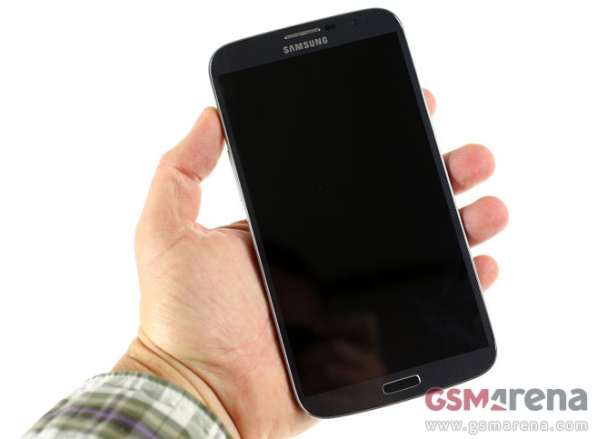
The recently announced Samsung Galaxy Mega phablet duo will soon be available in the Philippines. Both the Mega 6.3 and the Mega 5.8 are expected to be launched on June 15, although the pricing is yet to be confirmed.
The Samsung Galaxy Mega 6.3 measures 168.6 x 88.0 x 7.9mm and weighs 197g. The phablet comes with a 1.7 GHz Dual-core processor along with 1.5 GB of RAM, 8 megapixel rear camera, 1.9 megapixel front camera, 8GB inbuilt memory, Android 4.2 Jelly Bean and 3,200mAh battery.
The lower mid-range Samsung Galaxy Mega 5.8 sports a 5.8-inch qHD TFT display, measures 162.5 x 81.5 x 8.9mm, and weighs 182g. The Galaxy Mega 5.8 is powered by a 1.4 GHz dual-core processor and comes with a relatively small 2,600mAh battery. The smaller Mega does not support LTE, maxing out at HSPA.
Thanks Sanjay, for sending this in!
Source
ZTE V807 Blade E

ZTE seems determined to compete with the local phones. I took a quick look at the new ZTE Blade E which tried to take on the Cherry Mobile Flame 2.0, but which fell short. But the more important new entry of ZTE into the local market is the V807 Blade E. The Blade E tries to take on the Cherry Mobile Flare.
I would not be surprised if the Flare is the best selling smartphone in the country.
The ZTE Blade C feels and looks a lot like the Cherry Mobile Flare, even down to the old school four capacitative buttons which was the standard during the Gingerbread days. Its specifications are very similar too.
Quick specifications:
- Android 4.1
- 4-inch WVGA (480 x 800) display
- Dual sim support
- 4 GB internal storage expandable via a MicroSD card slot
- 512 MB RAM
- 1.2 GHz dual core Qualcomm Snapdragon S4 processor
- Adreno 203 graphics
- 3.2 MP autofocus primary camera with LED Flash
- No front camera
- HSPA
- WiFi
- Bluetooth
- A-GPS
- 1600 mAh battery
The main difference between the two is that the Flare has a higher 5 MP primary camera and has front camera. Blade C has a larger 1600 mAh battery, compared to the 1500 mAh unit on the Flare. In terms of price, the two are price closely. The Flare sells for Php3,999 while I found the Blade C selling for Php4,290.
Ultimately, it comes to marginally better battery life versus better cameras.
Google Play Hits 25 Billion Downloads! US 0 25 App Promo as a Thank You
Google Play Hits 25 Billion Downloads a few hours ago. In celebration, apps will be sold at a discounted price of US$0.25 over the next five days.

So far I noticed Gamelofts Asphalt 7, Rovios Angry Birds Space Premium, Kemcos Symphony of Eternity, Granny Smith, Draw Something and NFL Kicker 13 are all selling at just Php10.44 as part of the promotional sale.

On the non-gaming apps we have OfficeSuite Pro 6 +, Tasks and Ocean HD at just Php10.44.
I already bought Tasks a few months back. Great app. But I did pick up OfficeSuite Pro 6 + and Symphony of Eternity.
I already bought Tasks a few months back. Great app. But I did pick up OfficeSuite Pro 6 + and Symphony of Eternity.
I might not see some apps on sale, as I have bought several already. If you find anything else on sale, please do share it in the comments section.
Friday, June 28, 2013
Does the Cherry Mobile Thunder Eclipse the Flare
For over three months now, the Cherry Mobile Flare has been a darling to the local phone community. For Php3,999 you get 4-inch Android phone with a nice WVGA resolution (480 x 800) and a dual core Qualcomm processor. The Flare brings mid-level specifications at a entry level price. Cherry Mobile has several other popular phones, but none of them is as popular as the Flare. This is evident when you visit a Cherry Mobile store. When the Flare is on stock, expect a long line to buy one. But yes, the Flare is worth lining up for. It has no direct competition. No other phone comes close to matching the Flares price and specifications, even after three months.
 |
| I think we are all familiar with how the Flare looks like. Here is the Thunder. |
 |
| The good looks carry over to the side. |
 |
| OMG! Who designed the camera housing? Trust me, it looks worse in person. |
Cherry Mobile has come up with another seemingly unbeatable value for money proposition, and this one is aptly name the Thunder. This phone is priced Php4,999, a full 1K more than the Flare. You wont see any long lines for this one though, since you can only buy it online from Lazada.
The question is, is the Thunder worth Php1,000 more than the Flare.
Display. The most evident difference is the display size. The Flare has a 4-inch display, while the Thunder has a much larger 4.5-inch display. The bigger display does have its drawbacks. The 4-inch Flare has a WVGA (480 x 800) screen which has a pretty sharp 233 pixels per inch (ppi). The Thunder has a larger 4.5-inch FWVGA display (480 x 854) which is a bit less sharp at 218 ppi.
It is real estate versus pixel density. Both phones look reasonably sharp to me, so I will go with real estate.
Thunder value added: I think the bigger display alone is worth another Php1,000.
Flash: Both the Thunder and the Flare have 5 MP primary cameras and VGA front cameras, but the Thunder has no flash. This means no night shots, and no flashlight functionality.
Thunder value added: I think the absence of a flash and flashlight is worth at least Php500. So negative Php500.
Processor. The Flare come equipped with a dual core 1.2 GHz processor on a Qualcomm S4 Play chipset with Adreno 203 graphics. The Thunder comes with a slightly more powerful dual 1 GHz on a MediaTek chipset with PowerVR SGX531 graphics.
Thunder value added: I actually prefer the Qualcomm chipset, not so much for the power but because the Qualcomm chipsets on my phones seem to last forever. I dont have any long term experience with MediaTek chipsets. But faster is faster, so I would think the MediaTek chipset is worth Php500 more.
Battery. The Thunder comes with a larger 1800 mAh battery as against the Flares 1500 mAh unit. But the larger screen will also consumes the battery faster. It is pretty much a draw in terms of battery life.
Thunder value added: Php0.
Modern design. The Flare retains the older three button format of Android Gingerbread phones. The Thunder uses the newer Ice Cream Sandwich/Jelly Bean three button format. In some cases, it actually is better to have the four buttons, but apps are now designed around the three button format, and it does make the Thunder look more current.
Thunder value added: A newer look has to be worth something. Php250 value added to the Thunder.
The other specifications of these two phones are identical with 4 GB of internal storage expandable via a microSD card slot, 512 MB of RAM and WiFi and HSPA connectivity.
By my rather subjective valuation, the Thunder is worth the Php1,000 premium over the Flare. It is not a better value or money choice than the Flare. It really comes down to what size of phone you prefer, and how much you want the flash and the flashlight functionality.
Me, I like real estate. I would happily cough up Php1,000 more for the Thunder.
The Age of the Tablet is Here

Now, I am not sold on the tablet myself. But consider several things. My work entails a lot of writing. I work in my own office, so my office machine and personal machine are one and the same. I blog for a hobby. Needless to say, I need a nice comfortable keyboard which will get 4-6 hours of use on the average day.
When I check and respond to email, I do that on my mobile phone 90% of the time. I would say 95% of time on Twitter and Forums is spend on the mobile phone. I never instant message on my laptop anymore. The modern smartphone means I spend less time on the personal computer. Doing all this on a 7-inch to 10.6-inch display will be more fun and less stressful to the eyes than a 4 to 4.8-inch screen. A device like Samsung 5.3-inch Galaxy Note II could a do-it-all device.
If got a job where the office provided me with a computer in the office, or did not entail a significant amount of time writing, and if I gave up blogging, I think I would ditch the laptop for a tablet, or ditch the smartphone and laptop and replace it with a "phablet".
Point one is that most users dont need anything more than a tablet.
In terms of price, netbooks, the previous widely sold mobile consumer device had a cost of about 20K until tablets pushed netbook prices down to a bit over 10K. Entry level tablets these days, like Cherry Mobiles Paladin and Advance, COBYs Kyros series and number of other brands offer basic 7-inch tablets for as low a Php3,999. A budget of less than 10K gives your numbers choices of larger displays, HD resolutions and dual core processors.
The second point is that tablets are the cheapest mobile computers ever sold.
While the Apple iPad was not designed to make you decide to ditch your MacBook, other tablets have been going this direction.
Technology has made tablets more expandable. HDMI out allows your tablet to output content to a LCD TV. And these days, a 32-inch LCD TV and a low cost tablet can cost you just a much as an entry level laptop. Basically, when need a larger display, you can convert your tablet into a 32-inchcor larger desktop.
With technology like USB on-the-go, WiFi Network Storage, and apps like Paragon, it is only a matter of time before you find a suitable solution for mating your tablet with large amounts of external storage. This removes the main limitation of a tablet as a primary computing platform, limited storage.
Asus with its Transformer, Lenovo with its ThinkPad tablets, Microsoft with Windows 8 and its Surface tablet and Sony with its Viao Duo seem to recognize that this is the future. These devices are designed to be primarily be used as a tablet, with a fully functional keyboard available when needed. The Surface is the most compelling concept among the three. Recognizing that a keyboard is still important, but not that important, the Surface incorporates a keyboard that feels like its not there when not being used.

While the Surface is expensive today, I suspect that when next years Surface mobiles crop up, you will find current models occupying lower price points. I would not be surprised to see other manufacturers coming up with more Surface like designs. This kind of technology will be appealing to those of us who need a laptop more for the keyboard than power.
The last point is, tablets are becoming more capable by the year.
Low cost of acquisition will attract buyers. Improving technology will bring even in more consumers from laptops to tablets.
At the local Starbucks, I still see more laptops than tablets. I suspect by this time next year, the situation will be rather different.
Smart ‘Shock Proofs’ all postpaid plans
Smart Communications Press Release.

Read More..
[18 April 2013] Say goodbye to unexpected data charges as wireless leader Smart Communications, Inc. (Smart) introduces its Anti-Bill Shock (ABS) feature across all of mobile and broadband postpaid plans.
“‘Bill shock’ is now a thing of the past,” said Smart Postpaid Business Head Kathy Carag. “From today, all data charges from our postpaid offerings will be capped to certain amount so that our subscribers could enjoy worry-free surfing 24/7,” she said.
Data charging has been identified to be one of the leading causes of ‘unexpected charges particularly for subscribers using Internet-enabled smartphones.
Based on internal data, a number of mobile users are not aware that their new phones automatically connect to data services. This ‘background connection’ incurs charges which may result to excessive monthly bills.
With ABS in place, Smart Postpaid users who are not enrolled to either an Unlisurf or Always On package will be charged the default rate of P10 per 30 minutes until his or her data charges reach a total of Php1,200.
To illustrate, a Smart All-In Plan 500 subscriber who has consumed P300 worth of voice and SMS services and unknowingly keeps his or her data connection on will only be charged a maximum of Php1,500 until the end of the billing cycle.
Similarly, Smart Bro Postpaid users who exceed their monthly allocation will also be charged the default rate of P10 per 30 minutes until his or her data charges reach P999.
If a Smart Bro Flexisurf Pocket WiFi Plan 599 subscriber for example exceeds the 50 hour monthly allocation, he or she will only be charged an additional Php400 for the excess data charges. The plan then essentially turns into an unlimited surfing plan until the next billing cycle.
“It’s worry-free mobile surfing at its best,” said Smart Broadband Internet and Data Services Head Lloyd Manaloto. “Come try out the best data connection only from the network with four times more fiber power,” he said.
Manaloto refers to Smart and parent firm PLDT’s modernized mobile network which has been super-charged with 54,000kms of fiber optic cables (FOCs).
FOCs, unlike legacy copper wiring, uses beams of light to deliver and receive data from the core network to the base station and vice versa.
“Our fiber-powered network can handle millions of calls, billions of texts, and trillions of bytes of data, said Manaloto. “We have the only truly future-proof network in the Philippines.
To know more about Smart’s data plans, visit www.smart.com.ph or go to a Smart Store nearest you. [END]
Samsung Galaxy S IV Render
Okay, this is not the Samsung Galaxy S IV.

But dont you wish it was? :)
Source: @tamerally
Read More..
But dont you wish it was? :)
Source: @tamerally
Smart Communications to Launch Firefox Smartphones
Smart Communications announced at the Mobile World Congress 2013 that it will be adding mobile phones powered by Mozillas new Firefox operating system in the Philippines. A total of eighteen carriers announced that they would be carrying Firefox phones, and three manufacturers: LG, Alcatel and ZTE are building phones for it.
The new operating system wont convince you to switch from your Android or Apple smartphones, but should be priced at the lower price points, targeting the Nokia Asha and higher end feature phones. Firefox OS is a light operating system which runs mainly web apps. This allows for the use older hardware and thus build lower cost smartphones.

An example of what a Firefox OS phone will be like is the Alcatel One Touch Fire.
Alcatel One Touch Fire Quick System Specs:
- 3.5-inch HVGA (320 x 480) display
- 1 GHz single core processor
- 256 MB of RAM
- 512 MB of internal storage, with MicroSD card support
- 3G connectivity
Essentially, the specifications are like an Android or Apple smartphone from 2009. Using these now obsolescent parts will allow for parts manufacturers to use their older production lines, and for LG, Alcatel and ZTE to build some really low cost smartphones.
While all smartphones are heavily dependent on the Internet for functionality, these low cost Firefox smartphones are more dependent on an active internet connection to be useful. It will be interesting to see how Smart will create plans for these new smartphones.
The Apple iPhone 5 What the iPhone 4S should have been
Apple has just announced the new iPhone 5. Unlike last years launched where all the rumors were wrong, this time around, all the rumors were dead on:
4-inch, 640 x 1136 display resolution - The new iPhone has a larger 4-inch display which migrates to the 16:9 aspect ration, the same as aspect ration as HD (720 x 1280) and Full HD (1080 x 1920), which makes the new iPhone display more optimized for playing video content.
 The display is a sharp 326 ppi, altough Apple did not focus on this too much as it is not as sharp as the 4.3-inch 720p (720 x 1280) display with a 354 ppi on the Sony Xperia S. But I doubt anyone can tell which of the two is sharper.
 Apple has confirmed that App will have to be updated to run on the new display, and we are pretty confident that App Developers will do so shortly. This result in all older versions of the iPhone as obsolete.
7.6 mm thin and 112 grams in weight - Following current trends the new iPhone is thinner, at 7.6 mm, which is pretty impressive being 0.2 mm thinner than the HTC One S. While the iPhone 5 is a lot thinner than the 9.3 mm iPhone 4S, I do not think users will notice that much.
The really welcome change is in the weight now at just 112 grams. The older iPhone 4 and 4S were heavy for their size at 140 grams. The iPhone 5 now has a larger display at a much lighter weight.
The appearance is similar to the iPhone 4/4S, but the phone is now taller with an aluminum back instead of glass.
HSPDA+ 21.1 Mbps, DC-HSDPA and LTE. One area where the iPhone 4S disappointed was the 14.4 Mbps radio. This was fine is the US where no US carriers were running faster than HSDPA 14.4 and LTE. Philippine carriers do use HSDPA+ 21.1 towers.
LTE has also finally come to the iPhone. No surprises, but no disappointments either.
1 GB of RAM and new A6 chip. The 1 GB of RAM is double of the 512 MB of the iPhone 4/4S. Not too many details on the new processor but is has migrated to the 28 nm or 32 nm process as expected, which should result in improved battery life. Apple specifications place the battery life at the same level as the iPhone 4S. The processor is supposed to be twice as fast as that one found on the iPhone 4S.
Improved faster 8MP camera - The new 8 MP camera has a faster f/2.4 lens and also focuses and takes shots faster. Best to wait for the comparisons, but it does now add new features like Panorama mode.
Well, that is what I know of the new hardware for now. Nothing earth shattering but nothing disappointing. Whatever version of iPhone you current own, the iPhone 5 is a worthwhile upgrade. Once Apps are ported over to the iPhone 5, they probably wont be optimized for the older 2:3 displays on the iPhone 3GS and iPhone 4/4S.
Android owners will see nothing innovative in the Apple iPhone 5. Like I said, it is what the 4S should have been,
Android owners will see nothing innovative in the Apple iPhone 5. Like I said, it is what the 4S should have been,
Thursday, June 27, 2013
Globe Tattoo Mediapad Tablet now P7 800 with Tatoo Personalized Plan 999

With Smart Communications offering its Google Nexus 7 tablet at Php14,400 at 24 months zero interest, when bundled with a a Smart Bro Pocket WiFi Plan 599, Globe Telecom has reduced the price of its own tablet bundled with a Pocket WiFi device.
The Globe Media Pad, was previously offered at Php10,990 when bundled with a Tatoo Personalized Plan 999. Globe has reduced the cash price of the Tatoo Media Pad to Php7,800 when availed of with the Tatoo Personalized Plan 999 (24-month lock-in).
The Tattoo Mediapad and is actually the Hauwei Mediapad which is a 7-inch Android (Ice Cream Sandwich) tablet with a 7-inch HD (1280 x 800) display, 1.2 GHz dual-core processor, a 5 Megapixel camera and 8GB internal storage, expandable to 32 GB via a MicroSD Card.
While not as exciting as the Google Nexus 7, the Tatoo Mediapad is a solidly built device with an aluminum case giving it a nice solid feel.
Now I would not recommend getting a two year Pocket WiFi plan just to get this tablet, but if you are planning to get a Tatoo Personalized Plan 999, it would be a good idea to pick-up this tablet with it.
Microsofts best play in the Tablet Wars Sell keyboards

When I look at all the Windows 8 touch "hybrid" designs that have hit the market, I really only like one: Microsofts own Surface Tablet. The keyboard cover allows you to carry the keyboard with you all day without the penalty of lugging around more weight. Basically, it weighs as much as your typical tablet protective case. The simple kickstand incorporated into the Surface tablet allows for a light keyboard since it does not have to anchor the tablet in place. It is an ingenuous design.
Sales have not been great so far, with about 1.5 million Surface RT and Surface Pro tablets sold to date.
- This is not too hard to understand. Windows RT was a mistake. It look good when it came out, but Intel quickly proved its low powered Atom processors could run Windows 8 fine. This kind of made Windows RT redundant in Microsofts operating system line-up, with Windows RT being the less attractive sibling. The Surface Pro, well it is too expensive to be a volume seller.
- Microsoft Surface Pro, is more configurations might make a substantial impact on the market, with versions with HD displays (1366 x 768) and lower powered processors (Atoms and Core i3s) bringing options at more price points. More sizes (8 to 12 inches) could also attract more buyers.
Microsoft could get into the hardware business seriously and make a whole range of Surface tablets, but that would not sit well with their OEM partners.
What Microsoft could do to offer a wide selection of Surface type tablets, without causing a rebellion in the ranks of its OEM partners, is to sell keyboards. Basically, have it OEM partners build their own surface type tablet compatible with Microsoft branded keyboards and similar designs under license from Microsoft. The connector between the tablet and the keyboard should be standardized so that you can select any "Surface" type tablet from one company and a keyboard from any other company.
With this simple stroke and viola... Microsoft could become a serious player in the tablet game.
Well... its Saturday morning and I have not had my coffee yet.
LG Optimus G to Hit Local Stores Next Week

It took some time getting here, but the LG Optimus G will be hitting Philippine shores next week. The LG Optimus G is the phone on which the Google Nexus 4 is based on. It is a higher end device than the Google Nexus 4 with LTE support and 32 GB of internal storage
LG Optimus G E975 Quick specs:
- Jellybean 4.1.2
- 4.7-inch HD (1280×768) IPS display
- 1.5 GHz quad-core Qualcomm Krait
- Qualcomm APQ8064 Snapdragon S4 Pro
- Adreno 320
- 2 GB RAM
- 32 GB internal storage
- 13 MP primary camera
- 1.3 MP front camera
- HSPA & LTE connectivity
- Bluetooth 4.0
- WiFi 802.11 b/g/n
- GPS w/ AGPS support
- GLONASS TV-out (via MHL A/V link)
- 2100 mAh battery
The LG Optimus G is overall the best Android phone available in the Philippines at the present time.
The LG Optimus G has a suggested retail price of Php26,900. At this price, I would expect LG to cut the price of the Google Nexus 4 by a few thousand.
Google Chromebook Pixel

Google has launched its own Chromebook, the Chromebook Pixel. The Chromebook Pixel is a 12.85-inch laptop with a sharp 2560 x 1700 touchscreen display. The Chromebook Pixel is powered by a 1.8 GHz dual core Intel Core i5 processor, a 4 GB hard drive and Intel HD 4000 graphics. Two versions are offered, a WiFi only version with a 32 GB of flash storage, at US$1,299, and an LTE version with US$1,449 with 64 GB of flash storage.
Yup, that is no typo, the Chromebook Pixel starts at US$1,299. That is a big step up, from the prices of the other Acer (US$199), Samsung (US$249), HP (US$330) and Lenovo (US$430) Chromebooks.
The Google Chromebook Pixel comes with 1 TB of Google Drive storage for three years, instead of the 100 GB of storage bundled with the other Chromebooks. It also comes with 100 MB of LTE connectivity for two years. So a lot of services are bundled in with the price.
Nokia Lumia 720 and 520 available from Sun Cellular

The Nokia Lumia 720 is being offered for free at Sun Cellulars Plan 999 on a 24-month contract. This 4.3-inch Windows Phone 8 device is being offered with unlimited data, unlimited Sun-to-Sun text and four hours of Sun-to-Sun calls.
Sun Cellular is also offering the Nokia Lumia 520, free at Plan 600 on a 24-month contract. The Lumia 520 is Nokia entry level Windows Phone 8 device. Sporting a sharp WVGA 4-inch display, it really does not feel or look like a low cost device.
Plan 600 comes with unlimited calls and text within the Sun Network, 350 SMS to other networks and Php250 consumable.
You can read more about the Nokia Lumia 720 and 520 at this link.
Apple v Samsung Which Patents Infringed
You probably read about Apples US$1 billion win against Samsung in a US Court. Trying to figures our was was infringe is difficult based on the press coverage. I did find a good article on CNET which breaks it all down. The CNET article has a comprehensive list of which Samsung devices infringe and I suggest you take a look at that article. In brief this is a list of the Apple patents upheld:
Patents -
- 381 patent - This patent covers "the rubber band effect where a page bounces when a user scrolls to the bottom" and "includes touch-screen actions like dragging documents and multi-touch capabilities like pinch to zoom and twist to rotate."
- 915 patent - This patent "relates to a device capable of distinguishing between a single-touch scroll operation and a mult-itouch pinch-to-zoom operation."
- 163 patent - This patent covers behavior like "how you can double-tap a touch screen to enlarge and center portions of Web page, photo, or document."
- 305 patent - This one is more ornamental in natures and "centers on a grid of rounded square icons against a black background."
- Two other hardware patents are covered, the 677 patent and the 087 patent, which covers the appearance of a device.
Looking at the list in the CNET article on earlier Samsung designs were found to violate the 305, 677 and 087 patents. So on these patents, it looks more like an issue of paying damages more than anything else.
The 381. 915 and 163 patents being upheld are more problematic. While Apple did not invent the touchscreen, it owns a lot of patents covering how they are used which could be problematic for all touchscreen devices to work around.
Update: Apparently, pinch to zoom is not covered in the case.
Update: Apparently, pinch to zoom is not covered in the case.
Wednesday, June 26, 2013
The HTC One X versus the HTC One X
The HTC One X Android powered smartphones are HTCs most powerful devices in the Philippine market. The One X series comes with a large 4.7-inch HD display (720 x 1280), powerful quad-core processors on Nvidia chipsets, excellent 8MP cameras, HSDPA+ technology and pretty much everything you expect in top of the line smartphone for the Philippine market.

The newly released HTC One X+ will cost you about Php2,400 to Php4,000 more than the older HTC One X, depending on where you buy it. While the are two HTC One X+ models available, one with 32 GB of storage and the other with 64 GB of storage, the one being offering right now in the Philippines is the 64 GB variant.
The HTC One X+ brings upgrades in three areas:
1. SPEED > HTC One X (1.5 GHz quad core processor) versus HTC One X+ (1.7 GHz quad core processor)
The HTC One X+ will definitely by faster. The question is will, anyone notice? The 1.5 GHz processor in the HTC One X is fast enough to run any Android app. The HTC One X+ will run faster and benchmark better, but given how fast the One X is (with Sense 4.1), the additional speed is not worth the additional expenditure.
2. STORAGE > HTC One X (32GB) versus HTC One X+ (64GB)
The HTC One X and One X+ has no MicroSD card slot. So if you want more than 32 GB (26 GB user available) storage, the One X+ is clearly the way to go. A 64GB MicroSD card cost about Php2,500 to Php3,000 more than a 32 GB MicroSD card. So this aspect alone is worth the price premium of the HTC One X+ if you need the additional storage.
3. BATTERY > HTC One X (1800 mAh) versus HTC One X+ (2100 mAh)
How much more battery life does the additional 300 mAh bring? Based on GSMArenas battery life tests:
Talk time
HTC One X+: 13 hours 31 minutes
HTC One X: 9 hours 57 minutes
Web browsing
HTC One X+: 7 hours 56 minutes
HTC One X: 4 hours 18 minutes
Video Playback
HTC One X+: 8 hours 11 minutes
HTC One X: 5 hours 45 minutes
The battery life advantage is amazing. It is more than what you expect from a 17% larger battery. There are probably other improvements as well.
Conclusion
The HTC One X is a nice phone, but the HTC One X+ is just so much better. For a 2.4-4K price difference, I would really recommend the One X+.
SlickEdit 2012 v17 00
SlickEdit 2012 is a cross-platform, multi-language code editor that gives programmers the ability to code in over 40 languages on 9 platforms.
Designed by developers for developers, SlickEdit’s award-winning source code and text editor is respected for its rich set of coding tools and powerful time-saving programming features. A true cross-platform, multi-language editor, SlickEdit 2012 gives programmers the ability to code in over 40 languages on 9 platforms.
SlickEdit 2012 is a cross-platform, multi-language code editor that gives programmers the ability to code in over 40 languages on 9 platforms. This latest version builds on the company’s 24 years of experience in enabling developers and development teams to create, navigate, modify, build, and debug code faster and more accurately. SlickEdit 2012 delivers a wide range of powerful new features and existing feature enhancements, including:
New User Interface Architecture, Document Overview Bar, Support for Xcode 4 Workspaces, Beautifier Enhancements, Expanded Auto-Complete Facility, Ubuntu Unity Desktop, Android SDK Projects, Improved Objective-C Language Support, New Build Tool Wizard, ODB Editor Suite Support for Mac.
Android SDK Projects
There is a new Java project wizard that allows you to create and build Android applications and library projects. You can build, rebuild, and clean your Android projects by using the tools on the Build menu.

Typing a member access operator (for example, . in Java or "->" in C++) displays a list of the members for the corresponding object or symbol. To access this feature on demand, press Alt+Dot.

Use (Ctrl+Dot) to jump from a symbol to its definition. Use (Ctrl+/) to list all of the references for the current symbol and optionally jump to the first reference. These operations set a bookmark that can be popped to return you to the previous location (Ctrl+Comma). Use (Ctrl+Dot) to jump from a symbol to the symbol definition.

Read More..
Designed by developers for developers, SlickEdit’s award-winning source code and text editor is respected for its rich set of coding tools and powerful time-saving programming features. A true cross-platform, multi-language editor, SlickEdit 2012 gives programmers the ability to code in over 40 languages on 9 platforms.
SlickEdit 2012 is a cross-platform, multi-language code editor that gives programmers the ability to code in over 40 languages on 9 platforms. This latest version builds on the company’s 24 years of experience in enabling developers and development teams to create, navigate, modify, build, and debug code faster and more accurately. SlickEdit 2012 delivers a wide range of powerful new features and existing feature enhancements, including:
New User Interface Architecture, Document Overview Bar, Support for Xcode 4 Workspaces, Beautifier Enhancements, Expanded Auto-Complete Facility, Ubuntu Unity Desktop, Android SDK Projects, Improved Objective-C Language Support, New Build Tool Wizard, ODB Editor Suite Support for Mac.
Android SDK Projects
There is a new Java project wizard that allows you to create and build Android applications and library projects. You can build, rebuild, and clean your Android projects by using the tools on the Build menu.
Typing a member access operator (for example, . in Java or "->" in C++) displays a list of the members for the corresponding object or symbol. To access this feature on demand, press Alt+Dot.
- Show Comments - Comments are displayed in a mini HTML window which supports rendering Javadoc, Doxygen, and XMLdoc comments. When a symbol has multiple definitions or overloads, and multiple sets of comments, the comments will indicate that you are looking at item "< 1 of n >". Click on the arrows or use Ctrl+PgUp and Ctrl+PgDn to cycle through the comment sets.
- Completion on Space - Pressing the spacebar when List Members is displayed will insert the longest unique matching prefix from the symbols in the list. For example, if the list contains FLAG_CHAR and FLAG_LONG, then typing FL completes the line of code up to FLAG_.
Use (Ctrl+Dot) to jump from a symbol to its definition. Use (Ctrl+/) to list all of the references for the current symbol and optionally jump to the first reference. These operations set a bookmark that can be popped to return you to the previous location (Ctrl+Comma). Use (Ctrl+Dot) to jump from a symbol to the symbol definition.
Download SlickEdit 2012 v17.00 (mirror x32, mirror x64)
Serial or KeyGen OnlyNew Services Added to Smarts All In Plans

There is a war raging between the countries top two telecom companies. Globe had just unveiled its My Best Ever Super Plan which allows you to tailor fit your plan more than ever before. Smart on the other hand has added some very interesting services to its own configurable All-In Plan.
The most interesting new offering is the Php999 Unli Call & Text Combo which gives you unlimited calls and text with the Smart, TNT and Sun networks with 1 GB worth of mobile browsing for 30 days.
Another interesting new option is the Php400 Tri Net 400 option which gives you 500 minutes of Smart, TNT, Sun and PLDT Landline calls, 2000 SMS to all networks and 150 MB of mobile browsing for 30 days.
One new offering that does not seem to be worth it is the Php300 Tri Talk 300 which gives you 300 minutes of Smart, TNT, Sun and PLDT Landline calls. It would seem to make more sense to add Php100 and get Tri-Net 400.
These All-In Plans come bundled with mobile phones. The most interesting phones offered are as follows:
All-In Plan 1200 - Huawei Ascend D1
All-In Plan 1800 - HTC 8X and Sony Xperia V
All-In Plan 2500 - Sony Xperia Z
Apple iPad mini versus the Asus Google Nexus 7
 |
| Nexus 7 |
Both the Nexus 7 and the iPad mini competed in the same market segment. Those looking for smaller more portable tablets, so lets start there.
Size and weight - MINI
The Nexus 7 at 7.81 x 4.72 x 0.41 inches is a smaller but thicker device compared the the iPad mini at 7.87 x 5.30 x 0.28 inches. The iPad mini weighs less at 0.68 pounds as compared to the 0.75 pound Nexus 7. If I was picking based on just size and weight, I would go with the iPad minis dimensions hands down. The thinner and lighter are more important to me than the narrower girth.
 |
| iPad mini |
The Nexus 7 has a 7-inch HD (800 x 1280) display with a pixel density of 216 ppi. The iPad mini has a 7.9-inch 768 x 1024 display with a lower 168 ppi density. This is a much tougher category to decide.
Given that the iPad mini can bring a larger display with no penalty to size, I prefer the larger 7.9-inch display. The main drawback in my opinion with the iPad minis display is the SD 3:4 aspect ratio. Thus means the screen is not optimized to play HD and Full HD content, and it cannot play HD content at its native resolution.
Nexus 7 display is also protected by Corning Gorilla glass while the iPad mini by Oleophobic coating (similar to what is used in the Galaxy Nexus). Both should be scratch resistant enough.
I guess many will disagree, but I will call this round a draw.
Power - NEXUS 7
Neither device now runs on cutting edge technology. The iPad mini runs on a dual core Apple A5 processor which was considered to be cutting edge technology until the Q1 of 2012. The Nexus run runs a quad core Tegra 3 processor which was considered cutting edge until the end of Q3 2012. But both are fast enough.
Next year, the bulk of new Android devices designs will still just be migrating to dual core processors, so the Nexus 7 should give you a good two to three years of use before its hardware is completely obsolescent. The Apple iPad mini, is as fast as the iPhone 4S and iPad 2 released in 2011, and the Appe iPad 3 released in 2012 (once you factor in the screen resolution). Apple app developer will be supporting the iPhone 4S, iPad 2 and iPad 3 for the next two years or so. Both devices should last you long enough.
The Nexux 7 running as it does on Nvidias ULP GeForce graphics chip is capable of displaying graphical effects way beyond those that can be rendered by the iPad minis PowerVRSGX 543MP2. So we give this category to the Nexus 7 by a hair.
Cameras - IPAD MINI
This on is easy. The Nexus 7 comes with a 1.3 MP primary camera capable of doing 720 video, and no secondary camera. This is really only useful for apps that need a camera to work, but you wont be using it to capture pictures of video for your own use.
The iPad mini has a 5 MP camera, which can capture 1080p video, and a secondary camera for video calls. The iPad mini clearly, takes this round.
Battery Life - IPAD MINI
The Nexus 7 promises 9.5 hours of battery life, with the display set to 100-nit brightness. In real world use, it should be more like 8 hours. Apple promises 10 hours of battery life on the iPad mini, and you should get close to that in real world use.
Price and storage - NEXUS 7
Neither device now runs on cutting edge technology. The iPad mini runs on a dual core Apple A5 processor which was considered to be cutting edge technology until the Q1 of 2012. The Nexus run runs a quad core Tegra 3 processor which was considered cutting edge until the end of Q3 2012. But both are fast enough.
Next year, the bulk of new Android devices designs will still just be migrating to dual core processors, so the Nexus 7 should give you a good two to three years of use before its hardware is completely obsolescent. The Apple iPad mini, is as fast as the iPhone 4S and iPad 2 released in 2011, and the Appe iPad 3 released in 2012 (once you factor in the screen resolution). Apple app developer will be supporting the iPhone 4S, iPad 2 and iPad 3 for the next two years or so. Both devices should last you long enough.
The Nexux 7 running as it does on Nvidias ULP GeForce graphics chip is capable of displaying graphical effects way beyond those that can be rendered by the iPad minis PowerVRSGX 543MP2. So we give this category to the Nexus 7 by a hair.
Cameras - IPAD MINI
This on is easy. The Nexus 7 comes with a 1.3 MP primary camera capable of doing 720 video, and no secondary camera. This is really only useful for apps that need a camera to work, but you wont be using it to capture pictures of video for your own use.
The iPad mini has a 5 MP camera, which can capture 1080p video, and a secondary camera for video calls. The iPad mini clearly, takes this round.
Battery Life - IPAD MINI
The Nexus 7 promises 9.5 hours of battery life, with the display set to 100-nit brightness. In real world use, it should be more like 8 hours. Apple promises 10 hours of battery life on the iPad mini, and you should get close to that in real world use.
Price and storage - NEXUS 7
We lumped these two together because they really are inseparable. Right now the iPad mini will cost you Php5,000 to Php7,000 more, and give you less storage, at 16 GB versus 32 GB for the Nexus 7. To get the same amount of storage, it will cost you Php9,000 to Php11,000 more. Right now it does not look like a good time to buy an iPad mini.
When the prices go down, I still do expect the iPad mini to cost Php2,000 more, with less storage, or Php7,000 more with the same amount of internal storage.
Winner - NEXUS 7
The iPad Mini offers some compelling features, but it cost a little bit too much for what it offers.
Are Windows Phone and Windows RT Dead in the Water
In an interview with Bloomberg Germany, Apple co-founder Steve Wozniak said Microsoft’s Windows Phone and tablet operating systems will gain “enough critical mass to keep going with their tablets and phones.” By this time, I had expect Windows Phone to have a larger market share, and I am having a hard time sharing Mr. Wozniaks optimism.

Windows Phone. Data from IDC shows that in Quarter 4 of 2012, Windows Phone accounted for just 2.6% of the mobile phones shipped worldwide. Thus is up from 1.5% in the Quarter 4 of 2011. The numbers are not all that encouraging.
The 2.6% figure for the 4th quarter of 2012 represents 6 million smartphones. Another problematic figure is connect to this modest number. Of the 6 million Windows Phone smartphones shipped in Quarter 4 of 2012, 4.4 million were apparently Nokia Lumia phones.
With Samsung and HTC having to share in the remaining 1.6 million phones shipped, there seems to be little incentive for them to continue. Still HTC has had a long history as a Microsoft partner, and Samsung is getting bigger in the PC business.
If Windows Phone is going to gain traction, it would have to do so in Quarter 1 of 2013. The current Windows Phone devices are four or five month old designs, which I do not expect to see update for another seven or eight months. By Quarter 2 of this year, you can expect the new Android phones to cause a surge in Android phone sales. Later in the third or fourth quarter of the year, a new iPhone will see a increase in iPhone sales.
Should Quarter 1, 2013 sales of Windows Phones be lackluster, developers will have to decide if Windows Phone is worth it, given that the last quarter of 2012 and the first quarter of 2013 are likely the peak period for Windows sales.

Windows RT. Windows RT would appear to be in worse shape. Few of Microsoft OEM partners came out with RT devices. Total Windows RT device sales for 2012 appear to be less than 1 million units.
Worse, Windows RT seems now to be a superflous operating system. Windows RT was designed to run on ARM processors. But Windows RT plus ARM processors do not seem to offer any advantages over full Windows 8 tablets running on Intel Atom processors.
So, rather than trying to rake on iOS and Android in the tablet market, it would seem that Windows RTs number one competition is actually Windows 8.
So where does it go from here? Between Microsoft and Nokia Windows Phone will continue to exist for foreseeable future. Nokia is actually making money on selling phones again. What would kill Windows Phone quickly, is if Nokia decided to release Android devices. In the longer term, it will be developer support which will keep this platform alive, or end its life.
As for Windows RT, I would not be surprised if we do not see another Windows RT device released ever again.
Android 4 1 1 Jelly Bean Update Now Out Smart Communications Issued Samsung Galaxy Nexus Phones

The Android 4.1.1, Jelly Bean update is now rolling out over for Smart Communications issued Samsung Galaxy Nexus phones. The 160 MB update quietly came in over-the-air over the phones 3G connection.
Whats new in Jelly Bean (Scource: Android.com)
Android Beam
- With Android Beam, you can now easily share your photos and videos.
- Instantly pair your phone or tablet to Bluetooth® devices like headsets or speakers that support the Simple Secure Pairing standard by just tapping them together.
Audio Accessories
- Support for USB audio docks, shipping later this year.
 Browser and WebView
 Calendar
 Camera and Gallery
Data Usage
- You can now dismiss a data usage warning without changing the data threshold set for warning notifications.
- Disable background data usage on certain Wi-Fi SSIDs by designating them as mobile hotspots.
- Android now automatically detects when one Jelly Bean device is tethered to anothers Wi-Fi hotspot, and intelligently enables or disables background data usage on the SSID.
Face Unlock
- Face Unlock is now faster and more accurate, and startup is smoother with a new animation.
- You can improve face matching accuracy by calibrating your face in different conditions and with different accessories (e.g. hat, glasses).
- Face Unlock can now optionally require a blink to verify that a live person is unlocking the device rather than a photo.
Internationalization
- Jelly Bean adds support for bidirectional text and more input languages to make the platform accessible to more people around the world.
- There is improved support for Arabic and Hebrew, including a new Arabic font, in the platform.
- You can now enter text in one of 18 new input languages, including Persian, Hindi and Thai. Additional Indic languages Kannada, Telugu, and Malayalam are now supported by the platform.
- Emoji from Unicode 6.0 will now render when received or viewed.
- If the system language is set to Japanese, Japanese specific versions of glyphs will now be properly rendered.
Keyboard
- The platforms dictionaries are now more accurate and more relevant.
- The language model in Jelly Bean adapts over time, and the keyboard features bigram prediction and correction.
- You can now switch languages quickly with the dedicated language selector key on keyboard.
- You can use custom keyboard input styles for more than 20 languages, with keymaps for QWERTY, QWERTZ, AZERTY, Dvorak, Colemak, and PC styles.
- You can choose the input styles that you want to use for each keyboard, and use a hotkey to switch between them while typing.
 Messaging and Talk
Notifications
- You can now take action on notifications directly from the redesigned notifications shade.
- Notifications from the same application are grouped together, and the first item is automatically expanded. You can also pinch notifications to expand or collapse them.
- You now get an image preview in notifications after taking a screenshot. You can quickly share the screenshot directly from the notification.
- You can lock automatic display rotation from the notifications shade on 7" tablets.
- For Wi-Fi only devices, quickly see the SSID of the access point youre connected to from the notifications shade.
- You can now touch-hold a notification to identify the application that created it and turn off notifications from that application if needed, as well as uninstall the application.
Networking
- Wi-Fi protected setup is now supported with WPS push button and PIN support.
- A new setting lets you stay on mobile data and avoid nearby Wi-Fi networks with poor connections.
 News and Weather
 People
 Phone
Phone
 Settings
 System
Text-to-speech
- Jelly Bean introduces a new conversational text-to-speech voice in US English, available as both a network engine and an embedded engine via the TTS API.
Voice Typing
- A new embedded speech recognizer lets you use Voice Typing even when you dont have an Internet connection.
 Widgets
 Accessibility
Subscribe to:
Comments (Atom)