Tuesday, November 26, 2013
8 Awesome Keyboards for iPad
8 Awesome Keyboards for iPad:
Apple’s iPad has taken the tablet market by storm ever since it was released, selling millions of them in very less period. iPad has also hundreds of apps to customize like the iPhone. Most of us use the iPad for emails, web browsing, chatting and also social networking. But at the same time iPad has also gained popularity in the corporate world. But using the iPad for work is a bit difficult with typing documents, presentations etc using the on screen keyboard. Although the on screen keyboard performs well, for longer typing it is not suited and also it occupies almost half of the screen. In such cases you can get one of the external Bluetooth enabled keyboards for your iPad.
So here is a list of 8 best keyboard accessories for your iPad (2, 3 and 4 generations).

Read More..
Apple’s iPad has taken the tablet market by storm ever since it was released, selling millions of them in very less period. iPad has also hundreds of apps to customize like the iPhone. Most of us use the iPad for emails, web browsing, chatting and also social networking. But at the same time iPad has also gained popularity in the corporate world. But using the iPad for work is a bit difficult with typing documents, presentations etc using the on screen keyboard. Although the on screen keyboard performs well, for longer typing it is not suited and also it occupies almost half of the screen. In such cases you can get one of the external Bluetooth enabled keyboards for your iPad.
So here is a list of 8 best keyboard accessories for your iPad (2, 3 and 4 generations).
1. Apple wireless keyboard:
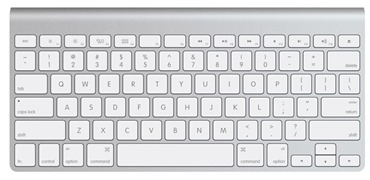
Although Apple Wireless Keyboard is not particularly made for iPad, it works well. The Bluetooth enabled keyboard works with Macs as well. Since this keyboard is designed for Macs, the keys are well spaced and easy to type. This is one of the best keyboards available for iPad, but does not come with a docking unit, you will have to use a separate dock with iPad.2. Logitech Ultrathin Keyboard cover-
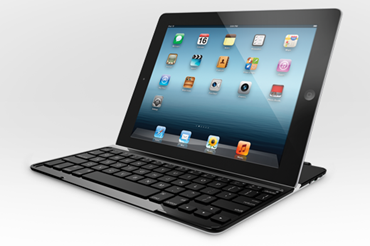
Ultrathin keyboard is a stylish, ultrathin aluminium screen cover that feels great and looks even better designed to complement your iPad. The Logitech Ultrathin Keyboard Cover securely attaches to your iPad, thanks to the clever magnetic clip. Aligned with the magnets built in the iPad’s frame, it draws tablet and cover irresistibly together. Instant On/Off automatically wakes your iPad when you open the cover and sends it to sleep when you close it and It is priced at $99.3. Solar Keyboard Folio for iPad-
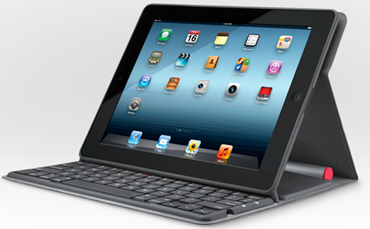
With the Solar Keyboard Folio, you don’t have to worry about battery or wires. The built-in Bluetooth keyboard draws its power from any type of light, both indoors and out. The Instant On/Off automatically wakes your iPad when you open the folio and sends it to sleep when you close it. The keyboard is priced at $129.99.4. Zagg Zaggfolio:
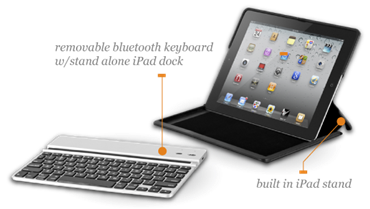
Created with a stylish design and a durable microfiber lining, the ZAGGfolio is an impressively thin multi-function iPad keyboard case for Apple iPad 3 & 4. The folio is complete with a removable Bluetooth keyboard and a built-in stand system, ideal for on-the-go use.The ZAGGfolio is priced at 99.99€ for folio and keyboard and 69.99€ for the keyboard alone.5. ZaggKeys Pro and Pro Plus:
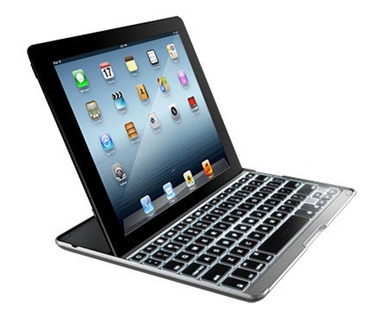
The ZAGGkeys PRO and PROplus are ultra-thin Bluetooth keyboard accessories that accentuate the utility and convenience of the Apple iPad 2, 3 or 4, with the added benefit of backlit keys on the PROplus model.The lightweight and durable aluminium construction of the ZAGGkeys PRO and PROplus match the look and feel of the iPad. The keyboard is priced at 139.99€ for the PROplus version and 109.99€ for the PRO version.6. ClamCase:
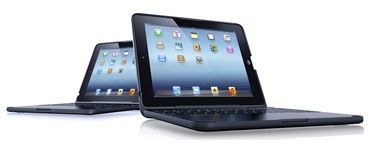
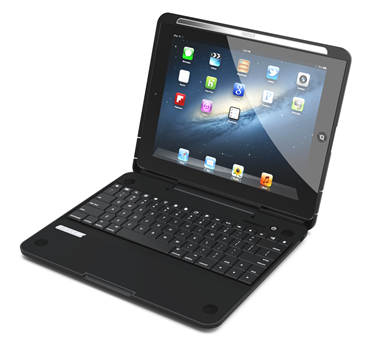
If you are looking to make your iPad look and work like a laptop or a netbook, then Clam Case is the best solution. It has a cover where you can slide you iPad and close it and look exactly like a laptop. But the main issue is the design and weight, if you are looking to carry it around, then its bulky. The keyboard is priced at $169 for the Pro version and $149 for the normal version.7. Belkin Keyboard Folio case:
Belkin Keyboard Folio Case was originally designed for iPad 2 and comes with a folio cover and a keyboard. It is a smart keyboard case with a strong keyboard and a flexible set of versatile transforming shapes for everyday use. It is priced at $79.8. Crux 360:
Crux360 for iPad features an all new snap in from the front design, which makes it very quick and easy to insert and remove your iPad. The new Crux360 also features a “window cover” on the back, which allows you to cover or uncover the Apple icon. It is compatible with various types of screen protectors. It is supported for iPad 2, 3 and 4 versions. Crux 360 is priced at $99.
Sunday, November 24, 2013
Samsung unveils secretive smartphone SCH W789

Samsung looks to have taken the humming world of personalised tech gadgetry by surprise today by officially launching the highly rumored, but quite secretive, Samsung SCH-W789 Android-based flip phone in China on Wednesday. Samsung has simply branded the phone with its model number without giving it any personality, unlike the Samsung Galaxy smartphones that received attention akin to the birth of the Catherine, Duchess of Cambridge, and husband Prince Williams royal child in Britain recently.
Samsung SCH-W789 will be available for the China Telecom users for about $800.
Features wise, Samsung SCH-W789 Android flip phone comes with dual 3.3 inch HVGA touch screen displays with the resolution of 320x480 pixels. It is running Android 4.1 Jelly Bean operating system version and it is powered by a 1.2GHz Qualcomm Quad Core processor along with 1GB of RAM memory. It is a dual SIM device with CDMA + GSM support with dual-standby features. Connectivity features of the phone include Bluetooth, WiFi, Micro USB and GPS. It also boasts a relatively staid, when compared to HTC One, 5 mega pixel rear camera with LED flash.
There is no information on the internal storage of the phone at the moment but it comes with microSD card slot to expend the memory. The phone is powered by a 1500 mAh battery and it comes with pre-loaded applications like Samsung Apps and Chat On messaging.
It will be available on China Telecom for 4999 yuan (about $816). There is no word on whether the phone will be released in any other market globally but another Android flip phone that has been seen is the Samsung Galaxy Folder that might be launched globally. via Muhammad Zulqarnain Zulfi
Friday, November 22, 2013
Portable Solar Powered Mobile Phone Battery Charger
Although electricity is a ubiquitous and there are times when it is not possible at all to connect your equipment to an electrical outlet. The purpose of the KIWI-Powered U-passes is to provide energy to any type of mobile device.

You can connect this device to any source of energy, including the car’s cigarette lighter, USB port, an outlet or even solar power through photovoltaic cells leaflets. Once loaded, it has the ability to store this energy for at least 6 months.

Finally, in terms of connectors, this Swiss Army knife of the batteries can be connected to virtually any device. From phones, to MP3 players or any other gadget.

In terms of capacity, the KIWI U-Powered masi can get loads of 1000 and has the ability to charge 2000mAh. The price was another pleasant surprise is which is less than $ 50 USD.

Wednesday, November 20, 2013
iOS Goes Past Symbian in Mobile Smartphone OS Usage in the Philippines

Based on webpage visits monitored by Statcounter, this is how the top mobile operating systems fared in terms of usage in the Philippines in March 2013.
- Google Android - 42.8%
- Apple iOS - 23.9%
- Symbian OS/Series 40 - 22.2%
- BlackBerry - 1.4%
- Windows Phone - 0.6%
March marks a milestone for iOS in the Philippines, as it passed the combined Symbian OS/Series 40 usage for the first time.
To put these results into perspective, they do not represent mobile device sales, but online usage. Symbian OS and Series 40 phones accounted for over 40% of online usage in 2012, and the decline of Symbian usage corresponds to the gains made in Android and iOS usage.
BlackBerry usage has remained constant while Windows Phone usage has maintained its slow increase.
Monday, November 18, 2013
HTC One and Samsung Galaxy S 4 Battery Life

GSM Arena has completed battery life tests on the HTC One and the Samsung Galaxy S 4. These two phone represent what is the cutting edge in Android hardware today, with Qualcomm S600 processors and 1080p displays. Both phones have larger batteries than the phones they replace, with the HTC One carrying a 2300 mAh unit and the Samsung Galaxy S 4 coming with a 2600 mAh battery.
The results of the endurance tests on these two phones is pretty amazing.

Sony Xperia Z - 16 hours and 3 minutes
LG Optimus G - 15 hours and 30 minutes
Samsung Galaxy S 4 - 13 hours and 53 minutes
HTC One - 13 hours and 38 minutes
Samsung Galaxy S 4 - 13 hours and 53 minutes
HTC One - 13 hours and 38 minutes
Samsung Galaxy S III - 10 hours and 15 minutes
Apple iPhone 5 - 8 hours and 42 minutes
The quad core Qualcomm S600 on the HTC One and Samsung Galaxy S 4 does not appear to be as efficient in this task as the Qualcomm S 4 processor on the Sony and LG phones.
Web Browsing
HTC One - 9 hours 58 minutes
Apple iPhone 5 - 9 hours and 56 minutes
Apple iPhone 5 - 9 hours and 56 minutes
Samsung Galaxy S4 - 8 hours and 42 minutes
Sony Xperia Z - 6 hours and 27 minutes
Sony Xperia Z - 6 hours and 27 minutes
Samsung Galaxy S III - 6 hours and 37 minutes
LG Optimus G - 5 hours and 15 minutes
LG Optimus G - 5 hours and 15 minutes
The HTC One is impressive in a statistical tie with the Apple iPhone 5. Samsungs Super AMOLED technology is not efficient in web browsing tests which predominantly use white or light colored backgrounds, but the Galaxy S 4 does well enough in this test. The Qualcomm S600 equipped phones seem to be a lot more efficient than the Qualcomm S 4 handsets in this test.
Video Playback
Samsung Galaxy S 4 - 10 hours and 16 minutes
Apple iPhone 5 - 10 hours and 12 minutes
Apple iPhone 5 - 10 hours and 12 minutes
HTC One - 10 hours and 2 minutes
Samsung Galaxy S III - 9 hours and 27 minutes
Samsung Galaxy S III - 9 hours and 27 minutes
LG Optimus G - 7 hours and 30 minutes
Sony Xperia Z - 5 hours and 39 minutes
The Samsung Galaxy S 4, Apple iPhone 5 and HTC One are a statistical tie for first place. The Qualcomm S600 equipped phones seem to be a lot more efficient than the Qualcomm S 4 handsets in this test.
Standby (with 1 hour of calls, video playback and web browsing per day)
Samsung Galaxy S 4 - 63 hours
Apple iPhone 5 - 51 hours
Samsung Galaxy S III - 50 hours
HTC One - 48 hours
Sony Xperia Z - 48 hours
LG Optimus G - 45 hours
While the HTC One and Samsung Galaxy S 4 have been neck and neck the whole way, the Galaxy S 4 leaves the HTC One is standby time. Having tested several Android 4.1 and 4.2 Rsayas, Android 4.2 seems to be much more power efficient on standby mode. The HTC One is running Android 4.1, while the Galaxy S 4 is running Android 4.2. A HTC update might improve the HTC Ones standby performance.
Source: GSM Arena
Apple iPhone 5 - 51 hours
Samsung Galaxy S III - 50 hours
HTC One - 48 hours
Sony Xperia Z - 48 hours
LG Optimus G - 45 hours
While the HTC One and Samsung Galaxy S 4 have been neck and neck the whole way, the Galaxy S 4 leaves the HTC One is standby time. Having tested several Android 4.1 and 4.2 Rsayas, Android 4.2 seems to be much more power efficient on standby mode. The HTC One is running Android 4.1, while the Galaxy S 4 is running Android 4.2. A HTC update might improve the HTC Ones standby performance.
Source: GSM Arena
Saturday, November 16, 2013
Common Broadband Problems and Fixes
come a long way from the days of dial-up net access with its lose service and broadband connections are now the example for lots of people around the globe. While lots of of the issues that dial-up users suffered through when utilizing their modems have been solved by the presence of an always-on connection, broadband modems and wireless routers can still cause headaches from time to time.
If you are facing a controversy together with your broadband connection & its source is not immediately obvious, take a glance at these broadband issues & fixes to help you to narrow down the issue:

Rule out remote issues.
Instead of being speedy to jump to the conclusion that you have got a local issue when you are unable to access a website, first decide with certainty that the trouble is not with the remote servers that you are trying to connect to. Even if the issue shows itself when visiting over site, it pays to be thorough before moving on to the next step.
Using your Windows command line, type ping google.com and hit the enter button. This will have your computer try to exchange tiny packets of knowledge with a popular web-site that you can trust is online and obtainable. If the ping shows as successful then you know that your computer is communicating with remote servers successfully; if not, you can assume the trouble is a bit closer to home.
Peripheral firmware trouble.
more complicated machines that they serve, peripherals are computers , jogging their own operating method & so subject to the same glitches & issues that they regularly see on our PC. If the application operating your modem or router is acting up, there is sure fix: the power cycle.
more complicated machines that they serve, peripherals are computers , jogging their own operating method & so subject to the same glitches & issues that they regularly see on our PC. If the application operating your modem or router is acting up, there is sure fix: the power cycle.
Not as fun to do as it is to say, power running basically means cutting power to the offending devices for a minute or, then plugging them back in. This will permit your modem & router to reboot, restarting all on-board application & resolving any related issues.
wiring for unexpected problems
It is a common scenario: a controversy with a web connection leads us to check every facet of our network over and over again, only to find that the ethernet cable in the router had wiggled lose. While they regularly try to persuade ourselves that the issue could not be that simple, it often is. Whether you have children, pets or even a window open wide to permit a powerful breeze, wires and cables tend to get shifted around under any circumstances.
While it may appear redundant, always take the time to make sure that each necessary hard connection is solid & that all wires & cables are where they ought to be; even in case you solve only a single case of net trouble in every attempts this way, you are bound to save yourself both time & frustration!
Firewall
Firewall
Sometimes the issue can be found right in front of you! Routers and modems are often painted as the bad guys in problematic net scenarios, but often the trouble can be a application issue on the computer itself. Given its nature, common piece of application that can add to connection issues is your firewall. While firewall application does a great job of monitoring and defending against undesirable connections between your computer and the outside world, the wrong settings can have your firewall blocking even you.
If you have only recently installed or updated your firewall and have subsequently faced a defective connection, the issue is definitely there. Double-check your settings to be positive that they are correct and think about switching to an simpler firewall solution in case you don not need all of the complicated bells and whistles.
When all else fails, contact your ISP
Your net service provider depends on a staggering amount of infrastructure to keep you connected and is subject to technical issues of its own from time to time. If you have thoroughly checked each potential issue area but continue to come up empty-handed, contacting your ISP for technical support and service information is the next obvious step.
Thursday, November 14, 2013
Google Nexus 4 price at just US 299

Google has officially announced the LG built Nexus 4. The Nexus 4 is built around a 4.7 screen has a 1280×768 resolution at 320ppi, the same display used in LG’s skinned Optimus G. It also has the Optimus’s Krait-based Snapdragon S4Pro SoC. Like the Optimus G, it comes with 2GB of system memory and a 2100mAh battery. It has an 8MP primary camera and a 1.3 MP secondary camera. It comes out of the box with Android 4.2 (Jelly Bean).
Despite all this, it is not a high end phone. The Google Nexus 4 is not designed to compete with the LG Optimus G or even the Samsung Galaxy S III and HTC One X. Google dropped LTE support and priced it is a mid-level phone. You also have to a choice between 8 GB or 16GB of storage, without a MicroSD slot.
While that is a bit disappointing, the price of US$299 for the 8 GB model and US$349 for the 16 GB model easily make up for the absence of LTE. Google is leaving LTE and the high end to its OEM partners. If LTE is a must, the LG Optimus G is the LTE version of the Google Nexus 4.
I wont complain though. I expect to see this phone hit the local markets at below 18K. Not bad for a quad core 4.7-inch HD phone. With local carriers LTE coverage being limited and no phone LTE plans being offered in the Philippines, the Google Nexus 4 is tailor fitted for the Philippine market.
Tuesday, November 12, 2013
Asus VivoTab Smart ME400c A Full Windows PC in a Tablet
Tablets with with full PC versions of Windows are nothing new. They have been around for some time, and for the most part have served a niche market. Windows 7 was not the best tablet operating system, and hence was the choice for a few enterprise clients who had to run full x86 PC software on a tablet form factor. Intel processors were also power hungry, giving this Windows tablets short battery life.
Enter Windows 8 and Intels new Clover Trail Processors. Windows 8 gives you a user interface and apps which are optimized for tablets. At the same time you can also run your old PC software. The best of both worlds. Intels new Clover Trail Processors have enough power to run a full Windows operating system and at the same time provide 8-9 hours of battery life.

While several of these devices have been released in the Philippines, the new Windows 8 powered Asus VivoTab Smart ME400c really make me take notice. This tablet is selling for just Php25,999 with 64 GB of internal storage. This is a really good price for a 64 GB tablet, and given that Windows 8 occupies a fair amount of space a 64 GB tablet is really pretty much compulsory for a tablet with a full PC operating system inside. You can also expand storage via a microSD card slot. Asus also bundles this tablet with 32 GB of Asus Cloud Storage for 36 months.
The Asus VivoTab Smart ME400c has a 10.1-inch display with a HD (1366 x 768 pixel resolution) display. Inside is an Intel Atom Z2760 dual core processor and backed-up by 2 GB of RAM. For connectivity you have WiFi, Bluetooth, HDMI, and a MicroUSB port. This tablet also comes with a 8 MP primary camera and a front facing 2 MP camera. Asus promises that you will get up to 9.5 hours of battery life with its new Windows 8 Tab.

Asus VivoTab Smart ME400c is almost as slim as an Apple iPad 4, at 9.7 mm, but the real bonus is that it is a lot lighter at just 1.28 pounds (an iPad 4 weighs in at 1.44 pounds).
A stylus and keyboard are available for the Asus VivoTab Smart ME400c, but I have not seen them yet locally, so I have no word on pricing.
Windows Phone has had a hard time gaining any traction. Windows RT tablets looks like they will get killed off by their full PC OS packing siblings. But I think Windows 8 tablets, might be able to break into the Android-iOS duopoly in a big way.
Sunday, November 10, 2013
Samsung Galaxy S 4 Plans Globe Telecom at Plan 1799 versus Smart Data Plan 2000

Globe Telecom will give you a Galaxy S 4 at Plan 1799 for a 24 month lock-in and Php4,800 cash. Bundle in Unlimited Data and you will have Php1,101 a month consumable for calls and SMS.
The closest Plan from Smart is Data Plan 2000. At this plan you can get a Samsung Galaxy S 4 with a 24 month contract for Php4,000.
Total commitment under the contact:
Globe - Php47,976
Smart - Php52,000
Consumable:
Globe - Php1,101. Globe to Globe calls @Php6.50 per minute, and other local calls @Php7.50 per minute. SMS a Php1.00. The consumable can be converted to other bundles like unlimited call and test with the Globe network.
Smart - 150 minutes of calls and 200 SMS to all networks. Calls in excess of 150 minutes at @Php5.09 per minute or Smart to Smart calls, and other local calls @Php6.11 per minute. SMS a Php1.00.
Unli Data:
Globe - LTE
Smart - LTE until June 30, 2013. Not certain if there will be an additional charge after that.
All-in-all total cost is cheaper with Globe, the consumable aspect of the plan is more flexible and can be converted to thing like unlimited calls and text or other bundles and LTE is a certainty. Smart offers lower per minute and SMS rates.
Friday, November 8, 2013
LG Optimus G2 spotted at Bluetooth SIG and in benchmarks
Its been six months since the LG Optimus G was released and it seems we have already come across its successor. The Optimus G2, as it is being called, was spotted getting its Bluetooth certification at the Bluetooth SIG and also in AnTuTu benchmark scores.
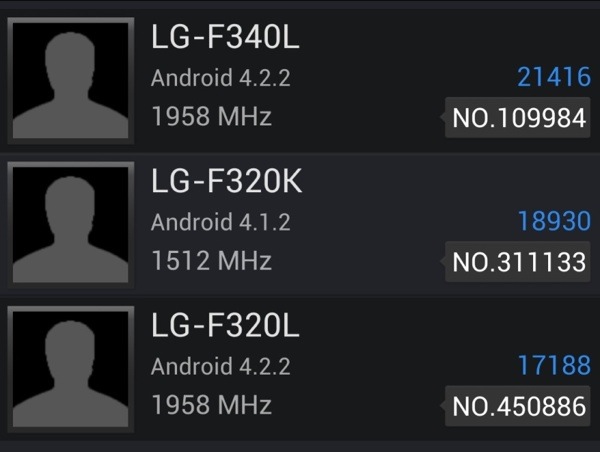
The benchmark scores reveal three variants of the G2, the F320K, F320L and F340L. The F320K has a 1.5GHz processor and runs on Android 4.1.2. The other two run on a 2GHz processor, which is most likely the Qualcomm Snapdragon 800 as it is the only processor that can clock that high as of now. The last two models run on Android 4.2.2 instead.
Interestingly, the F320L, despite the 2GHz processor, scores lower than the F320K in AnTuTu.
Other than the processor, it is being said that the G2 will have a 5.0-inch, 1920 x 1080 resolution display, 13 megapixel rear camera and 2.1 megapixel front camera. Hopefully, more information about this device will surface soon.
Source
Wednesday, November 6, 2013
Nokia Lumia 920 Finally Here!

The phone which a lot of you have been waiting for is finally officially here: the Nokia Lumia 920. I am not sure what the suggested retail price is, but the Nokia Lumia 920 can be had for Php25,750. Yup, this is with a full manufacturers warranty.
This Nokia Lumia 920 is the current king of Windows Phones. Putting this phone on the top of the Windows 8 Pack is the combination of a 4.5-inch HD (768 x 1280) PureMotion HD+ display with clear black technology, a 8MP primary camera with Carl Zeiss Optics and optical image stabilization, and finally an LTE chip.
This is the first smartphone with optical image stabilization. GSMArena explains how all this works. A gyroscope is used to detect the motion of the phone and the whole optical assembly moves in the opposite direction to cancel out the movement. That happens 500 times a second.
If you are still holding on to your Nokia N8 with its revolutionary camera, this really is probably the phone for you. If you the camera on a phone is a major consideration, you should really take a long look at this phone.
We wrote more about the Nokia Lumia 920 in a previous post at this link.
Monday, November 4, 2013
HTC One X 64 GB

The HTC One X+, an update to the HTC One X is here. The HTC One X+ has the Samsung Galaxy S III in its sights.
HTC has improved the HTC One X+ by giving it a larger 2100 mAh battery, which is 300 mAh larger than the 1800 mAh in the HTC One X. This matches the battery on the Samsung Galaxy S III. To make up for a absence of MicroSD card slot, HTC now offer two models of the HTC One X+. One with 32 GB like the older One X, and the other with 64 GB.
HTC has also upped the performance of the HTC One X+ by increasing the speed of the processor to 1.7 GHz from 1.5 GHz.
The HTC One X+ also comes with a new red accented theme (like the Sensation XE) and comes out of the box with Android 4.1.1, Jelly Bean.
The official price of the HTC One X+ is a hefty Php32,800, but at CMK Cellphones it is selling for just Php27,900 for the 64 GB model. This is just Php2.400 higher than the Php25,500 selling price of the older One X. With a larger battery, more storage and a faster processor, the One X+ looks like a better deal the the One X.
The Samsung Galaxy S III has now gone down in price, so it costs just as much as a Galaxy S III. What do you think? Will the One X+ be able to take some of the Galaxy S IIIs sales?
Saturday, November 2, 2013
Iron Man is the Hero HTC Deserves HTC Spends 1B for Ad Campaign With Robert Downey Jr

HTC is taking a knocking in the smartphone department from Apple and Samsung (hey, at least theyre not BlackBerry), but it looks like theyre ready to fight back with a helping hand: Iron Man. Robert Downy, Jr. is the face of HTCs new ad campaign, entitled "Change," which theyre spending $1 billion on for the next two to three years.
What are the best kind of commercials? The ones that make you laugh. Before we continue, a quick game of riddle-me-this: What does "HTC" stand for?
Yeah, didnt think you would know. HTC knows you dont know either. So, their RDJ commercials play on just that: the HTC acronym, and RDJs quest to offer alternatives (like, "Hold This Cat," "Humongous Tinfoil Catamaran," and, "Hipster Troll Car-wash").
The ads are set to start airing Aug. 15, but theres a teaser for the campaign up now that you can check out below. [via Venture Beat]
Subscribe to:
Comments (Atom)